CPU & Power Control
Tune processor behavior and power settings to pursue stronger, more responsive performance.
- Detected CPU frequency
- Processor boost
- CPU core parking
- Ultimate Performance plan
Unleash performance you didn’t know your PC had.
Go beyond the ordinary. Discover MaxBoost.
Fine-tune Windows, reduce unnecessary overhead, and bring gaming and productivity tools together to pursue smoother, more responsive performance.
More control. More potential.
Installed software for Windows 10 and 11
Advanced tweaks. Serious control.
Reduce unnecessary overhead and pursue smoother gameplay with CPU controls, gaming scheduling, guided cleanup, and Windows responsiveness settings.
Tune processor behavior and power settings to pursue stronger, more responsive performance.
Shape Windows scheduling and foreground priorities around smoother, more focused gameplay.
69 entries: 13 automatic preferences and 56 guided settings. Review your choices and confirm before applying.
Bring a snappier feel to Windows, tailor its appearance, and keep system integrity checks clear and controlled.
Available options depend on your system. Results vary.
One unified performance toolkit
Prepare games, cut unnecessary overhead, tune Windows, inspect your hardware, and recover supported changes without breaking your flow.
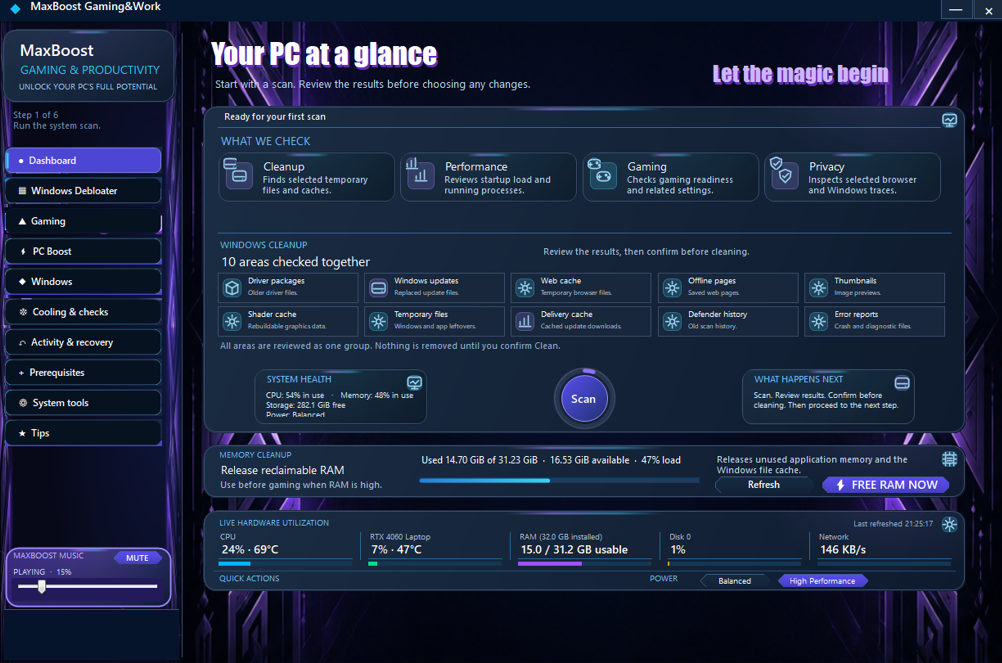
See system, cleanup, memory, and detected live hardware insights together. Review the findings, then confirm the cleanup you want.
69 entries bring together 13 automatic preferences and 56 guided settings. Keep category selections, review your choices, and confirm before applying.
Analyze targeted Windows changes, choose the settings that suit your games, then apply your boost or restore supported tweaks.
Tune detected CPU maximum frequency, processor boost, and optional Windows performance settings from one focused page.
Make Windows feel more responsive with instant menu response and visual presets. Check or repair system integrity with visible progress and an abort control; restore supported settings individually.
Explore power, hardware, and energy-efficiency diagnostics to make better-informed performance choices. Readings depend on available sensors.
Track recorded actions and reach recovery tools for supported changes, so your tuning history stays clear.
Prepare games with a choice of bundled optional Redist installers, selected and run on your terms.
Keep essential Windows maintenance utilities close for faster, more focused system care.
Turn practical guidance into smarter performance, maintenance, gaming, and productivity decisions.
PC Speed Boost
Use detected CPU information, maximum-frequency control, processor boost, and optional Windows settings to tune performance for your system.
CPU configuration
Detected hardware
Max frequency
User controlled
Processor boost
Optional
Performance on your terms
Find targeted opportunities, review each change, and build a performance setup that fits the way you game and work.
Start with optional boost cards, analyze Windows changes, and choose what fits your games. Apply Boost, Restore supported tweaks, or open useful Windows shortcuts.
Choose from 13 automatic preferences and 56 guided settings. Keep selections across categories, review the combined list, confirm, and apply.
Experiment with greater confidence using Restore for supported tweaks. Some PC Boost original-setting backups remain available after the app closes; other actions may require separate recovery steps.
Stay informed through administrator approval where required, visible system-check progress, and clear results before you decide what comes next.
Simple offline activation
Activate the computer itself with a PC-bound license file, then use MaxBoost Gaming&Work without an account sign-in.
Open the same MaxBoost customer app on the computer and copy its PC code.
A PC-bound signed license file is issued specifically for that code.
Import the file into MaxBoost. Once activated, the app can be used offline.
The license file is issued for one PC, so copying it normally will not activate another computer. Hardware changes or reinstallation may require support or reissue.
Launch preview · Not yet on sale
The complete MaxBoost Gaming&Work toolkit for one Windows PC, with free updates and a one-time payment.
Preview the complete toolkit at €24 plus applicable VAT; the final tax-inclusive total is shown before payment. There is no launch expiry; purchasing is not open yet.
Price
€24
+ applicable VAT
Prelaunch: checkout, invoices, and automated delivery are not available. The production download is not yet supplied.
Your Windows PC
Designed for Windows 10 and 11. Choose the settings that fit your hardware and the way you use your PC.
Product support
Questions about MaxBoost, activation, or a hardware change? Contact support to discuss your PC and the next steps.
Include your Windows version and relevant error details. Hide personal details in screenshots. Never send payment-card details, passwords, or signing keys.
Send your order reference or purchase email and the new PC code to support for ownership review and a replacement PC-bound license. Only one Windows PC is licensed. Replacement requests are reviewed individually; transfer limits, fees, and timeframes are not confirmed. Never send payment-card details, passwords, or signing keys.
Questions, answered
Discover how MaxBoost helps you tune your PC for smoother gameplay, responsive performance, and more control.